Why 14 KB?
Here, real requests for reference.
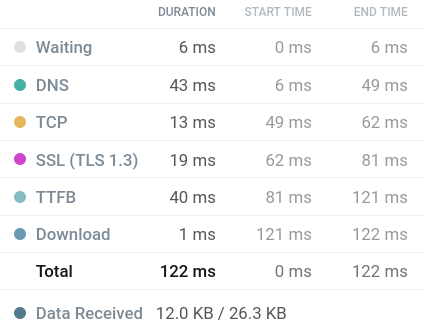
A site that fits in 14kb:
One that doesn’t:
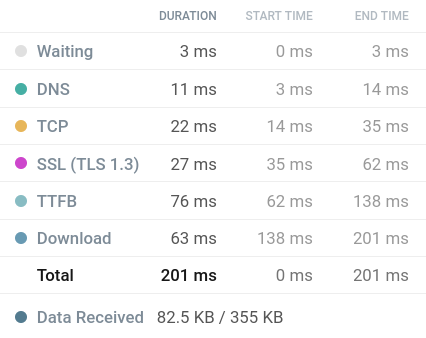
Download - that’s the actual site content.
1 ms vs 63 ms - 63x speed difference, with only a 7x weight difference.
How the hell?
This braindump is an attempt to dig into this topic down to the guts. TCP, DNS, TLS, slow start, the 1986 congestion collapse. And along the way, the philosophy of small web: why a tiny site is respect for the user, not a numbers circlejerk.
and I’ll talk about my own sccl.cc optimization
Whatamhow TCP
Before the server sends even a single byte of HTML, a fuckton of things happen.
Three-way handshake
Every TCP connection starts with a three-way handshake:
- Client sends
SYN - Server replies
SYN-ACK - Client finishes with
ACK
Three messages back and forth. Only then can you send data.
That’s +1 RTT just to say hello.
There’s TCP Fast Open (TFO) - lets you cram data into the SYN packet. But it only works for repeat connections and needs support on both sides. Rare in practice.
Congestion collapse 1986
In early 1986, the internet nearly died.
Node count passed 5,000, bandwidth was uneven. TCP without congestion control just flooded the channel with packets. Routers dropped them, hosts resent, routers dropped more - avalanche.
Throughput dropped 1,000x. The network became unusable.
They called it congestion collapse.
In 1988, Van Jacobson published “Congestion Avoidance and Control” describing four algorithms that saved the internet: slow-start, congestion avoidance, fast retransmit, fast recovery.
These four became mandatory parts of TCP. They essentially prevented the internet from collapsing in the 80s and 90s as traffic grew exponentially.
Slow start
The idea is simple: the server has no idea what the channel bandwidth to the client is.
If you blast 100 packets immediately - you can clog the network and trigger that same congestion collapse. So you start small and ramp up.
The server maintains a variable called cwnd (congestion window) - how many packets it can send without waiting for ACK.
initcwnd - the starting value of this window:
- Originally: 1 segment
- RFC 3390: 4 segments
- RFC 6928 (2013): 10 segments
Google pushed the increase to 10 in 2013 through experiments showing it doesn’t make things worse. Some CDNs (Cloudflare, Fastly) set it to 30 or more.
Then exponential growth:
Server sent 10 packets - waits for ACK
ACK arrives - window doubles to 20
Sent 20 - waits
Window to 40, then 80…
Each cycle is one RTT.
The bigger the response, the more rounds.
If the response fits in initcwnd - it flies out as a single packet with no waiting - one round trip.
For large files (images, video) this isn’t a problem - TCP has time to ramp up over a few RTTs. But most website files are under 100kb - and that’s where the pain starts.
Look: a 100mb file - first couple RTTs it ramps up, then pumps at full speed. Those first RTTs are a drop in the ocean.
A 30kb file - lands right where slow start is just beginning to ramp. Instead of one RTT - two. Instead of ~50ms - ~100ms.
And if there’s a dozen such files, each on a new connection - each goes through this dance from scratch.
Who burns what
Before the server even gets to sending HTML - a whole ritual. Every step is an RTT.
DNS: +1 RTT
Domain resolution. Usually cached, so in most cases 0ms. But a cold lookup - honest RTT.
TCP handshake: +1 RTT
SYN, SYN-ACK, ACK. No way around it.
TLS: +2 RTT (or +1 with TLS 1.3)
TLS 1.2: 2 RTT. TLS 1.3: 1 RTT. With 0-RTT resumption you can get it down to 0, but only for repeat connections.
Btw, the certificate itself can weigh several kilobytes and not fit in initcwnd. Simon Hørup Eskildsen analyzed the Danish newspaper information.dk - certificate was 6908 bytes, initcwnd was 3 (old Linux). The certificate didn’t fit in the window, and the TLS handshake took 3 RTT instead of 2. Just because the server waited for ACK mid-certificate.
Fuck.
Total: minimum 3-4 RTT before the first byte of HTML. And we haven’t even started sending content. Once we do - slow start kicks in.
Satellite
There’s a great example from Nathaniel at endtimes.dev:
Oil rig. Dudes forgot their D&D dice and want to hit missingdice.com over satellite internet.
Packet path:
phone -> WiFi router -> dish -> satellite (35,786 km) -> ground station -> server
One RTT: 1ms (router) + 120ms (ground-to-satellite) + 120ms (satellite-to-ground) + 60ms (ground-to-server) - roughly 300ms one way.
Full round trip: 612ms. That’s one RTT.
With 4 RTTs (DNS + TCP + 2xTLS) before the first byte: 2.5 seconds.
With slow start over several rounds - all of 4-5 seconds.
For a dice website.
You see it now, right?
The magic of 14,600
Let’s count:
- MTU Ethernet: 1500 bytes
- IP header: 20 bytes
- TCP header: 20 bytes
- Payload: 1500 - 40 = 1460 bytes per packet
- initcwnd = 10 packets
- 10 x 1460 = 14,600 bytes = ~14.25 KB
That’s where the number comes from.
Step function
It’s not linear.
14kb - 1 RTT.
15kb - 2 RTT.
29kb - 2 RTT.
30kb - 3 RTT.
Every time you cross a window boundary - a whole RTT gets added. The difference between 14kb and 15kb can be bigger than between 15kb and 40kb.
The fun part: HTML gets compressed with gzip. 27kb raw easily becomes 12kb gzip. And 12kb - still in initcwnd, one RTT.
14KB Club counts uncompressed. So by club rules you need to fit in 14kb raw HTML.
But in reality, a 20-30kb raw site with gzip is almost as fast as a “pure” 14kb site. The difference - nanoseconds on decompression.
Though counting compressed would make more sense, imo. Whatever.
What about HTTP/2, HTTP/3?
There’s this idea that multiplexing kills the 14kb rule. It doesn’t.
HTTP/2 lets you send multiple requests over one TCP connection. But TCP slow start is still there - it’s a TCP thing, not HTTP. The first request still goes through slow start.
HTTP/3 (QUIC) runs over UDP. But the QUIC spec recommends the same initcwnd of 10 packets.
Plus, the HTTPS handshake and HTTP/2 preface eat part of the initial window. Barry Pollard analyzed in detail that by the time HTML is sent, the window may already be larger than 10 - ACKs were being sent during TLS negotiation. So “exactly 14kb” is a simplification.
But the mechanics are the same. Understanding them beats obsessing over the number.
Small web is not about kilobytes
The small site thing - it’s not just about speed. It’s about philosophy.
Clubs
There’s a whole ecosystem: 1MB Club, 512KB Club, 250KB Club, 14KB Club. Plus various no-js.club, nocss.club and such.
The 512KB Club homepage says it outright:
The internet has become a bloated mess. Huge JavaScript libraries, countless client-side queries and overly complex frontend frameworks are par for the course these days.
And they’re right.
NYT - a newspaper layout, text and images - weighs 9 megabytes over 891 requests, half of which is JavaScript. That’s fucked up.
A site that by nature can’t be heavy, somehow turned into a monster. And ok, if it were a webgl experiment. It’s a newspaper. Text and pictures.
Motherfucking website
If you haven’t seen motherfuckingwebsite.com - go look. One HTML file, no CSS, no JS. Black text on white background. 5kb.
Then came bestmotherfucking.website - minimal CSS, 78 bytes inline. Then thebestmotherfucking.website - with a dark theme, but 132kb, kinda too much.
There’s also justfuckingusehtml.com - 29kb of pure HTML. No frameworks, no bundlers, no transpilers. Just HTML.
This whole lineup - not just a meme. It’s a manifesto.
Respect
Remember the satellite example? 612ms per RTT. Someone on an oil rig wants to visit a site - and it takes 5 seconds to load.
Not because the content is heavy.
Because the developer didn’t give a shit.
Threw in 5 megabytes of JS, three 200kb fonts, PNG images instead of WebP, tracking, ads.
A small site is respect for the user. For their time. For their data plan. For their battery. For the fact that not everyone has fiber and 5G.
Ilya Grigorik in HPBN writes:
No bit is faster than one that is not sent.
It’s not about “make your site gray and dull”. It’s about “don’t drag a fuckload of kilobytes the user doesn’t need”.
By the way, the 512KB Club gives a Green Team badge to sites under 100kb. sccl.cc at 27kb raw would qualify. But I wanted more.
Optimizing sccl.cc
I have this little site sccl.cc. Built on Zine - an SSG in Zig. Three pages: contacts, projects, peripherals.
before migrating to Zine it was on Astro and weighed 150+kb, see Migration-from-Astro-to-Zine.md
What the server was originally sending:
- HTML (~15kb)
- Space Mono + Martian Mono woff2 (~40kb)
- Avatar PNG (~2mb)
- Favicon PNG (~1mb)
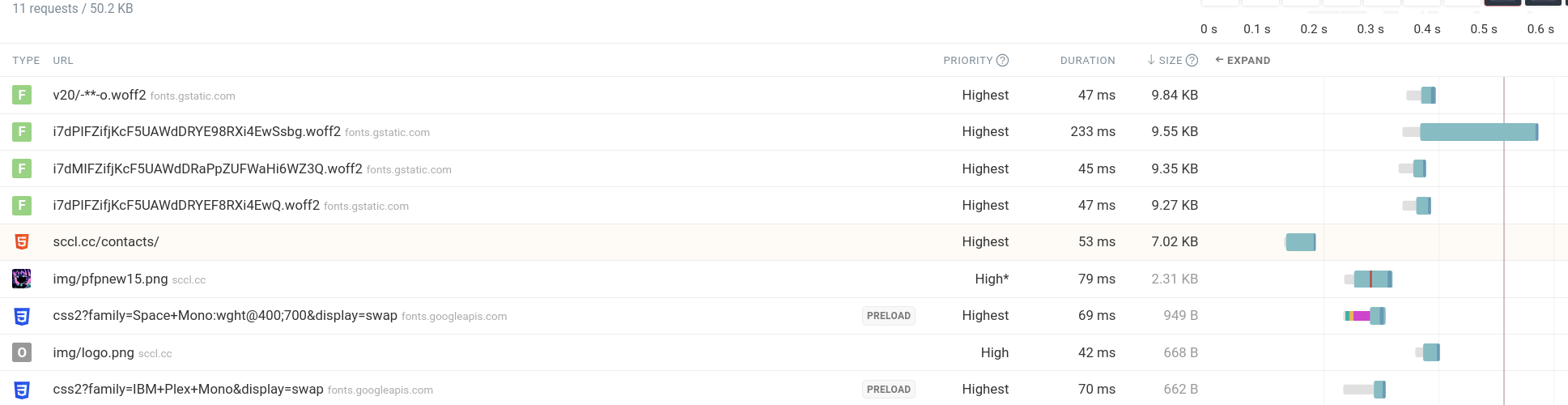
screenshot is already a bit optimized, it was worse :skull:
Four requests per page for content that weighs practically nothing. And this is with keep-alive and HTTP/2 - setup once, but every new connection, every new tab - all over again.
Plan: everything in one HTML. Base64 inline all the things. Zero external requests. Fit in initcwnd with compression.
Font
The fattest thing. 2 fonts + bold variants = 40kb.
Honestly, custom fonts are fucking unnecessary most of the time. But aesthetics won - decided to keep one, stripping the file down to ASCII only.
Tool: pyftsubset from fonttools. Strips out non-latin ranges, characters not used on the site.
Result: 4.2kb, in base64 - 5.7kb of text in the HTML.
Avatar
Pixel art, rendered at 400%, PNG with alpha channel. Fat.
Shakalizer, three colors, PNG - 1.9kb. Convert to WebP - 702 bytes.
Base64: 940 bytes.
Favicon
Same tricks. 199 bytes in PNG (for tiny images it beats WebP).
Base64: 268 bytes.
JS
Animated buttons, animated background, an easter egg with animation. All for looks. Actually useful stuff - almost none.
But I wanted to keep the functionality. Everything went inline. ~4kb of scripts the site would work fine without. But pretty.
Result
Before: 4 requests, ~50kb
After: 1 request, 12kb gzip / 27kb raw
Fits in initcwnd. One TCP data packet after the handshakes - and the site is ready.

The inline dilemma
Inlining everything is a tradeoff. There’s a cost.
Caching
A font in base64 inside HTML - doesn’t get cached. When navigating to another page, the browser downloads it again, because it’s part of the HTML.
With a separate file, the font would be cached after the first load. The second page would load without it.
When to choose what
Everything in one HTML (base64 fonts)
2 pages at 14kb each
Each - 1 RTT
But every time you eat the full 14kb, even if the font repeats
HTML + separate font
2 pages at 8kb + 4kb font separate
First visit: 2 requests
Navigation: only 8kb, font cached
In the real internet, you won’t feel the difference between 14kb and 8kb - both fit in one initcwnd.
But delays between requests - you will.
Overhead
Inline weighs a bit more than an external dependency - base64 adds ~33% to binary data. If you’re already not exceeding initcwnd with external resources - you don’t fucking need inline.
It makes sense when the difference between “fit in one RTT” and “didn’t fit” is critical.
For sccl.cc the difference was dramatic: 4 requests vs 1, 50kb vs 12kb. Worth it.
Bottom line
14kb is not a magic number. It’s a consequence of TCP architecture, designed for reliability and fairness, not for first-load speed.
Understanding the transport layer gives you more than blindly following “the 14kb rule”. Sometimes you need inline, sometimes separate files with caching. Sometimes 30kb raw with gzip is almost the same as 14kb without.
But the philosophy remains: less is faster. And the less crap you drag onto your site, the more respect for the user.